---
title: Publish and discover assets in your PHP projects
hidetitle: true
currentMenu: discovery-introduction
---
Discovery
=========
Publish and discover assets in your PHP projects.
[](https://packagist.org/packages/thecodingmachine/discovery)
[](https://packagist.org/packages/thecodingmachine/discovery)
[](https://packagist.org/packages/thecodingmachine/discovery)
[](https://packagist.org/packages/thecodingmachine/discovery)
[](https://scrutinizer-ci.com/g/thecodingmachine/discovery/?branch=1.1)
[](https://travis-ci.org/thecodingmachine/discovery)
[](https://coveralls.io/github/thecodingmachine/discovery?branch=1.1)
This package is designed for *framework developers* and *package developers*. It helps you find "static" assets in your Composer packages.
What problem does this solve?
-----------------------------
For your project, you are looking to search through all the installed packages for some kind of resource. It could be:
- all the classes implementing some interface
- a set of config files scattered in some packages
- JS or CSS files
- ...
We offer a simple solution to solve this problem:
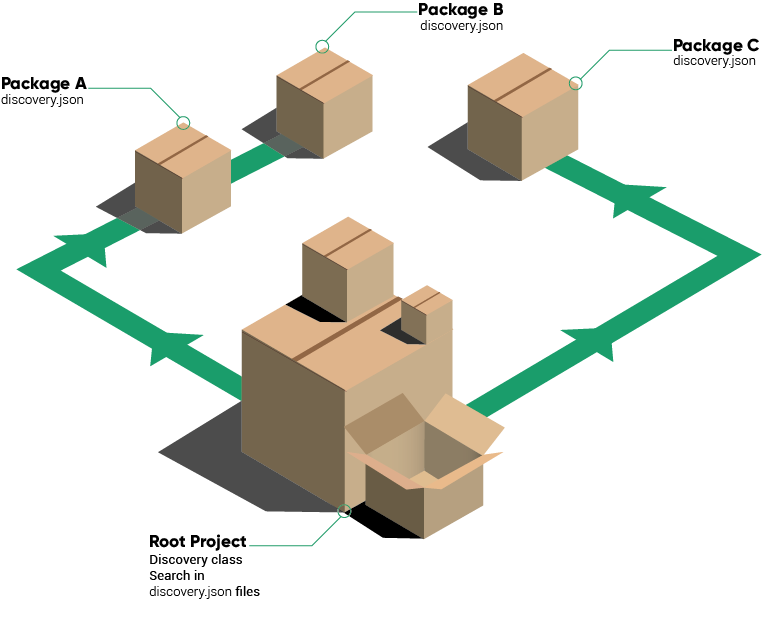
- Packages **publishing** assets add a `discovery.json` file at the root of the package. This file contains the list of *published assets*.
- you include `thecodingmachine/discovery` in your project
- you use the `TheCodingMachine\Discovery` class to explore the available assets
A real use case
---------------
Discovery should be of great use to framework developers.
Look at the way most frameworks handle the installation of bundles/modules:
1. you add the module to your project using `composer.json`
2. then you need to register the class of the module/bundle/service provider in your project
This second step is completely useless. If a developer adds a Composer dependency, it is almost always to use it. It would be great if the framework could easily explore composer packages and find modules/bundles or service providers by itself.
Discovery allows this:
```php
use TheCodingMachine\Discovery;
$assets = Discovery::getInstance()->get('my_framework_modules');
// This would scan all discovery.json files and returns an array of class names.
```
In the example above, `my_framework_modules` is the "asset type". It represents a kind of static assets (in this case, the class name of a framework module).
discovery.json format
-----------------------
In packages *publishing* assets, put a `discovery.json` with the following format:
```json
{
"my_framework_modules": [
"My\\Module\\ClassName",
"My\\OtherModule\\ClassName"
]
}
```
Want to view the full syntax of `discovery.json`? Check out [the discovery.json schema document](doc/discovery_schema.md)
Also, an asset type can be really anything, it does not have to be a class name. For instance, you could decide to publish some translation files:
```json
{
"translations": [
"translations/translation.po"
]
}
```
Install
-------
Simply run:
```sh
composer require thecodingmachine/discovery
```
More documentation
------------------